Webex Messaging
API Guide
This article provides detailed information on the messaging features and methods provided by the Webex iOS Messaging SDK.
The SDK lets you easily implement real-time messaging capabilities including posting new messages, and deleting, listing, and editing existing messages.
anchorBefore Continuing: Sync Webex Spaces
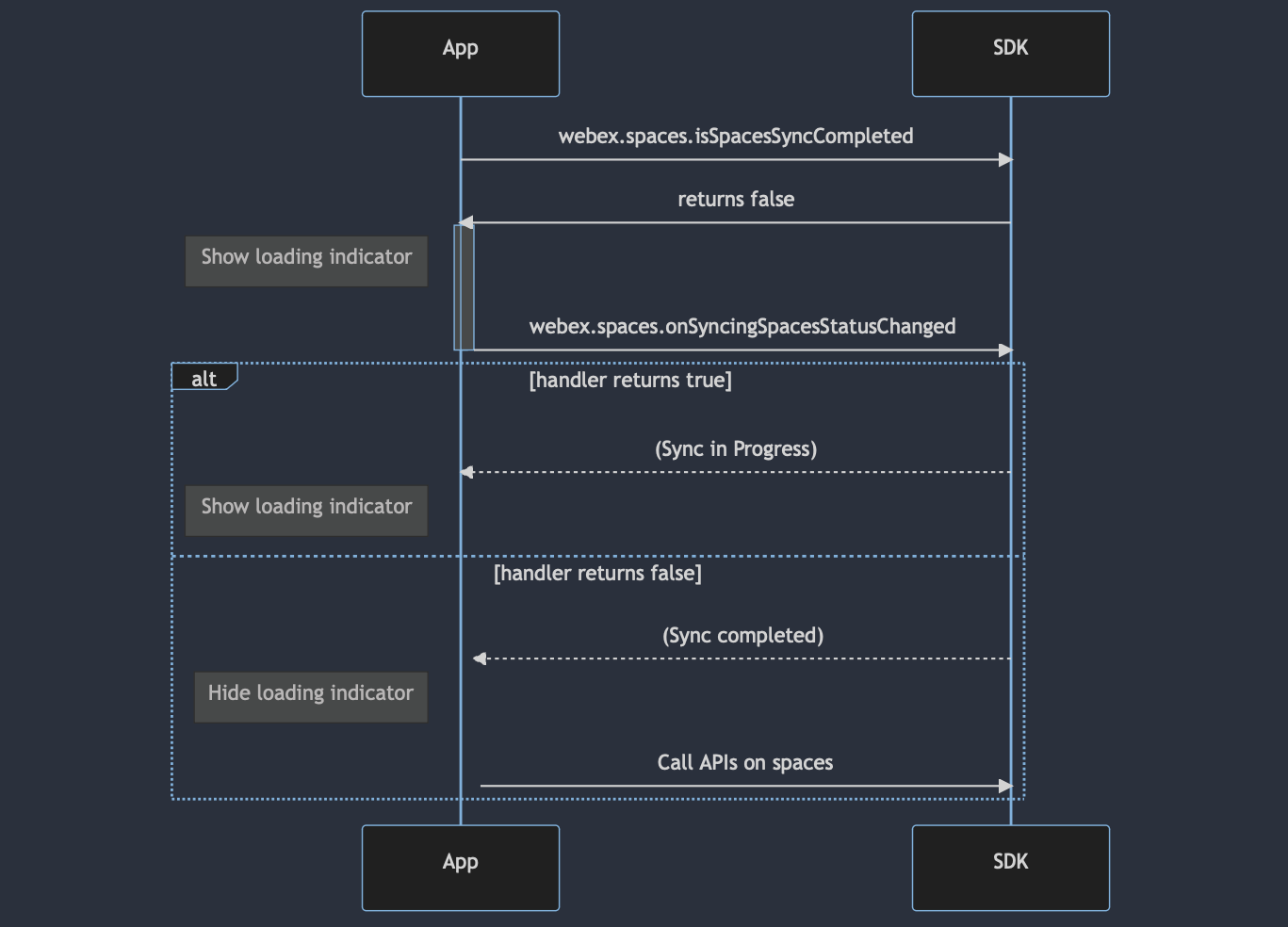
anchorBefore working with spaces or messages within them, ensure that all spaces are synced using the following method:
// Indicates if the latest conversations have been synced to the local data warehouse.
// Returns true if the sync is completed.
// Returns false if the sync is in progress.
webex.spaces.isSpacesSyncCompleted

// The callback handler for sync status changes.
webex.spaces.onSyncingSpacesStatusChanged = { isSpacesSyncInProgress in
    // isSpacesSyncInProgress is true if a space sync is in progress.
    // isSpacesSyncInProgress is false if a space sync is complete.
 }
anchorPost a Text Message to a Person by ID
anchorTo post a text message to a particular participant using their personId:
webex.messages.post(personId: "{personId}", text: "text..."){ response in
     switch response.result {
         case .success(let message):
             // ...
             break
         case let .failure(let error):
             // ...
             break
     }
}
Post a Text Message to a Person by Email
To post a text message to a person using their email address:
guard let emailAddress = EmailAddress.fromString("{person email address}") else{ return }

webex.messages.post(personEmail: emailAddress, text: "text..."){ response in
     switch response.result {
         case .success(let message):
             // ...
             break
         case let .failure(let error):
             // ...
             break
     }
}
Post a Text Message to a Room
To post a text message to a room using its roomId:
webex.messages.post(roomId: "{roomId}", text: "text..."){ response in
     switch response.result {
         case .success(let message):
             // ...
             break
         case let .failure(let error):
             // ...
             break
     }
}
Post Single Mentions
To post a message that includes mention(s) of individual person(s):
//create person mention items with personId
let mentionItem1 = Mention.person("{personId1}")
let mentionItem2 = Mention.person("{personId2}")
let mentionArray = [mentionItem1, mentionItem2]

webex.messages.post(roomId: "{roomId}", text: "text...", mentions: mentionArray){ response in
     switch response.result {
         case .success(let message):
             // ...
             break
         case let .failure(let error):
             // ...
             break
     }
}
Post a Group Mention
To post a message that includes a group mention:
//create a group mention item.
let mentionItem = Mention.all
let mentionArray = [mentionItem]

webex.messages.post(roomId: "{roomId}", text: "text...", mentions: mentionArray){ response in
     switch response.result {
         case .success(let message):
             // ...
             break
         case let .failure(let error):
             // ...
             break
     }
}
anchorPost Local Files
anchorTo post a message with attached files using local paths:
let fileItem1 = LocalFile.init(path: "{local file path}")
let fileItem2 = LocalFile.init(path: "{local file path}", name: "{file name}", mime: "{file mime type}")
let fileArray = [fileItem1, fileItem2]

webex.messages.post(roomId: "{room id}", text: "{text...}", files: fileArray){ response in
    switch response.result {
        case .success(let message):
            // ...
            break
        case let .failure(let error):
            // ...
            break
    }
}
Post Files with Uploading Progress
To post a message with a file and monitor the uploading progress:
guard let fileItem  = LocalFile.init(path: "{local file path}", name: "{file name}", mime: "{file mime type}",
    progressHandler: { (progress) in // progress as double }) else {return}

webex.messages.post(roomId: "{room id}", text: "{text...}", files: [fileItem]){ response in
    switch response.result {
        case .success(let message):
            // ...
            break
        case let .failure(let error):
            // ...
            break
    }
}
Post Files with a Thumbnail Preview
To post a message with a file that includes a thumbnail:
let fileThumb = LocalFile.Thumbnail.init(path: "{file path}", mime: "{mime type}", width: 320, height: 400)
guard let fileItem  = LocalFile.init(path: "{local file path}", name: "{file name}", mime: "{file mime type}",
    thumbnail: fileThumb, progressHandler: { (progress) in // progress as double }) else {return}

webex.messages.post(roomId: "{room id}", text: "{text...}", files: [fileItem]){ response in
    switch response.result {
        case .success(let message):
            // ...
            break
        case let .failure(let err):
            // ...
            break
    }
}
anchorDelete a Message
anchorTo delete a message using its messageId:
webex.messages.delete(messageId: "{message id}", completionHandler: { (response) in
    switch response.result{
        case .success(_):
            // delete operation successful.
            break
        case .failure(let err):
            // delete operation failed
            break
        }
})
anchorList Messages Before a Specific Date
anchorTo list messages before a particular date point within a room, with max specifying the maximum number of messages to return:
let before = Before.date("{one date point}")

webex.messages.list(roomId: "{room id}", before: before, max: 50) { response in
    switch response.result {
    case .success(let messages):
        // ...
        break
    case .failure(let err):
        // ...
        break
    }
}
anchorList Messages Before a Specific Message
anchorTo list messages before a particular message within a room:
let beforeMessage = Before.message("{message id}")

webex.messages.list(roomId: "{room id}", before: beforeMessage, max: 50) { response in
    switch response.result {
    case .success(let messages):
       // ...
       break
    case .failure(let err):
        // ...
        break
     }
}
anchorList Messages That Mentioned Your ID
anchorTo list messages in which your ID is mentioned within a group room:
let mentioned = Mention.person("me")
webex.messages.list(roomId: "{room id}", max: 50, mentionedPeople: mentioned) { response in
    switch response.result {
    case .success(let messages):
        // ...
        break
    case .failure(let err):
        // ...
        break
    }
}
anchorMessage Reception Events
anchorTo handle message reception events:
webex.messages.onEvent = { messageEvent in
    switch messageEvent{
    case .messageReceived(let message):
        // received message...
        break
    case .messageDeleted(let messageId):
        // deleted messageId...
        break
    }
}
anchorDownload Simple Files
anchorWhen a message with files is received, this code will download each file to default location:
webex.messages.onEvent = { messageEvent in
    switch messageEvent{
    case .messageReceived(let message):
        if let files = message.files {
            for file in files {
                webex.messages.downloadFile(file) { result in
                    if let localUrl = result.data{
                        // file downloaded successfully in localUrl ...
                    }
                }
            }
        }
        break
    case .messageDeleted(let messageId):
        // ...
        break
    }
}
anchorDownload Files to a Particular Destination
anchorThis code snippet is similar to the previous one, but it specifies a destination directory where the files should be downloaded:
webex.messages.onEvent = { messageEvent in
    switch messageEvent{
    case .messageReceived(let message):
        let destination = URL.init(string: "{destination directory}")
        if let files = message.files {
            for file in files {
               webex.messages.downloadFile(file, to: destination) { result in
                    if let localUrl = result.data{
                       // file downloaded successfully in localUrl ...
                    }
               }
            }
        }
        break
    case .messageDeleted(let messageId):
        // ...
        break
    }
}
anchorDownload Files with a Progress Handler
anchorIn addition to downloading the files, this snippet provides a progress handler that reports the progress of the file download:
webex.messages.onEvent = { messageEvent in
    switch messageEvent{
    case .messageReceived(let message):
        if let files = message.files {
            for file in files {
               webex.messages.downloadFile(file, progressHandler: { progress in
                      // progress in double
               }) { result in
                    if let localUrl = result.data{
                      // file downloaded successfully in localUrl ...
                  }
               }
            }
        }
        break
    case .messageDeleted(let messageId):
        // ...
        break
    }
}
anchorDownload Thumbnails
anchorTo download the thumbnails of the files included in a message:
webex.messages.onEvent = { messageEvent in
    switch messageEvent{
    case .messageReceived(let message):
        if let files = message.files {
            for file in files {
                webex.messages.downloadThumbnail(for: file) { result in
                    if let localUrl = result.data{
                        // file downloaded successfully in localUrl ...
                    }
                }
            }
        }
        break
    case .messageDeleted(let messageId):
        // ...
        break
    }
}
anchorDownload Thumbnails to a Particular Destination
anchorSimilar to downloading files, this snippet specifies a destination for the downloaded thumbnails:
webex.messages.onEvent = { messageEvent in
    switch messageEvent{
    case .messageReceived(let message):
        let destination = URL.init(string: "{destination directory}")
        if let files = message.files {
            for file in files {
               webex.messages.downloadThumbnail(for: file, to: destination) { result in
                    if let localUrl = result.data{
                       // file downloaded successfully in localUrl ...
                    }
               }
            }
        }
        break
    case .messageDeleted(let messageId):
        // ...
        break
    }
}
anchorDownload Thumbnails with a Progress Handler
anchorTo download thumbnails with a progress handler to monitor the download progress:
webex.messages.onEvent = { messageEvent in
    switch messageEvent{
    case .messageReceived(let message):
        if let files = message.files {
            for file in files {
               webex.messages.downloadThumbnail(for: file, progressHandler: { progress in
                      // progress in double
               }) { result in
                    if let localUrl = result.data{
                      // file downloaded successfully in localUrl ...
                  }
               }
            }
        }
        break
    case .messageDeleted(let messageId):
        // ...
        break
    }
}
anchorSend a Read Receipt
anchorTo send a read receipt for a message:
webex.messages.markAsRead(spaceId: spaceId, messageId: messageId, completionHandler: { result in
     switch result {
     case .success(_):
         // Read receipt sent successfully.
     case .failure(let error):
         // Failed to send read receipt.
     }
})
anchorMembership Events
anchorTo handle membership change events:
webex.memberships.onEvent = { membershipEvent in
      switch membershipEvent {
      case .created(let membership):
          // A new membership was created.
      case .deleted(let membership):
          // A membership was deleted.
      case .update(let membership):
          // A membership was updated.
      case .messageSeen(let membership, let lastSeenId):
          // A message was seen by a member.
      }
}
anchorList Memberships with Read Status
anchorTo get the read statuses of all memberships in a space:
webex.memberships.listWithReadStatus(spaceId: spaceId, completionHandler: { response in
      switch response.result {
      case .success(let readStatuses):
          // Process read statuses.
      case .failure(let error):
          // Handle error.
      }
})
anchorSpace Events
anchorTo handle space change events:
webex.spaces.onEvent = { spaceEvent in
      switch spaceEvent {
      case .create(let space):
          // A new space was created.
      case .update(let space):
          // A space was updated.
      case .spaceCallStarted(let spaceId):
          // A call started in the space.
      case .spaceCallEnded(let spaceId):
          // A call ended in the space.
      }
}
anchorGet Space Read Status
anchorTo get the read status of a space for the logged-in user:
webex.spaces.getWithReadStatus(spaceId: spaceId, completionHandler: { response in
      switch response.result {
      case .success(let spaceInfo):
          if let lastActivityDate = spaceInfo.lastActivityDate,
              let lastSeenDate = spaceInfo.lastSeenActivityDate,
              lastActivityDate > lastSeenDate {
              // Space has unread messages.
          } else {
              // Space is fully read.
          }
      case .failure(let error):
          // Handle error.
      }
})