AI in Webex
Overview
As part of the "Bring Your Own" (BYO) initiative, Webex Contact Center aims to enable seamless integrations with third-party AI providers, enhancing the Webex customer experience with cutting-edge AI innovations. Bring your own Virtual Agent is the first slice of all other other AI functionalities you can bring to Webex Contact Center product offerings.
anchorWhat is a Voice Virtual Agent?
anchorIn essence, a Voice Virtual Agent interacts with callers during voice calls and performs the following key functions:
- Transcribes the caller's speech to text for AI processing.
- Utilizes Natural Language Understanding to identify the caller's intent.
- Maps the identified intent to an existing workflow (OR) uses Generative AI to create a text response.
- Converts the generated text to speech which is then prompted to the caller back.
- For escalated calls, provides the human agent with context by supplying the Virtual Agent's transcript or a summary.
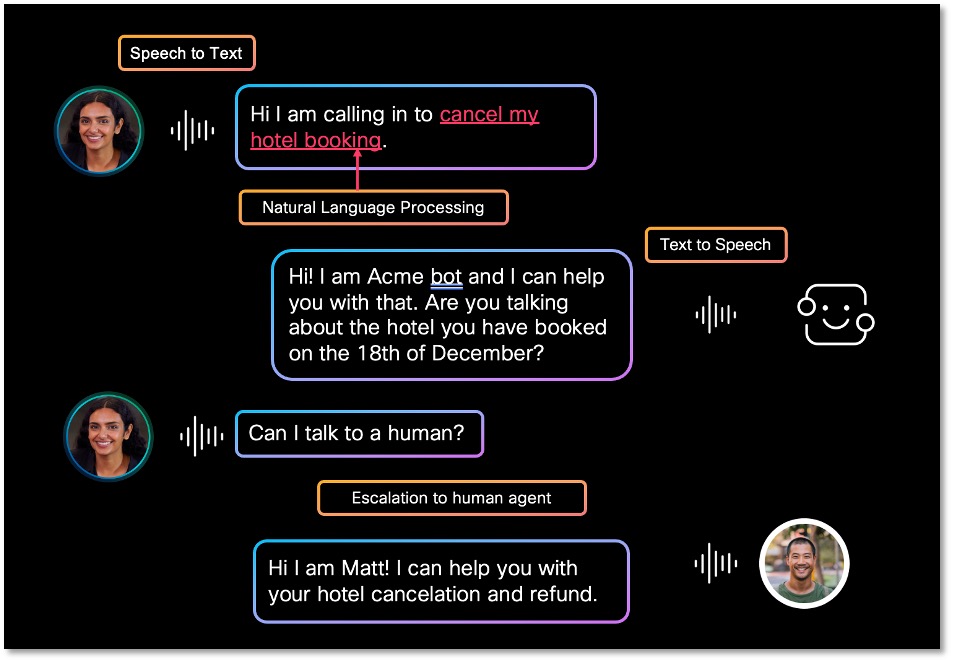
Fig 1: A sample Virtual agent call that is escalated to a human agent
anchorPhase 1 - Development
anchorDialog Connector Simulator
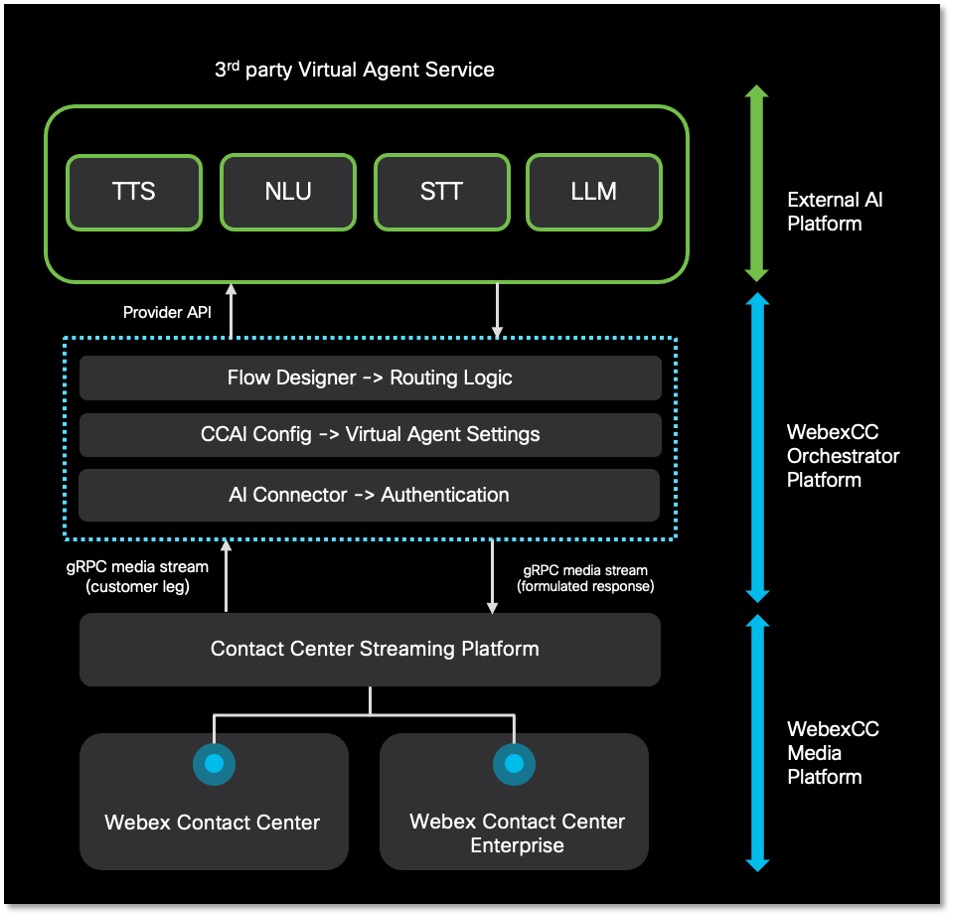
Fig 2: Architectural Diagram for provisioning an Virtual Agent
The Dialog Connector Simulator is a sample Java application that demonstrates how to integrate an external conversational interface with Webex Contact Center IVR. Refer to the Dialog Connector Simulator Sample Code for guidance.
All media from Universal Harness (media platform) is streamed using gRPC APIs, and the Virtual Agent APIs use bidirectional streaming to send and receive media from the 3rd party provider.
For implementation details, see BYOVA over gRPC. If you are using the JSON transport instead, see BYOVA over WebSocket.
For the gRPC variant, you can optionally enable mTLS authentication to add transport-layer client authentication. mTLS does not apply to the WebSocket variant and does not replace the existing JWS/JWT validation.
- Start by getting yourself a Webex Contact Center Sandbox.
- Request Voice Virtual Agent entitlements via developer support.
- Go through the protobuf definition.
- Sample Code: https://github.com/CiscoDevNet/webex-contact-center-provider-sample-code
Catch the code walkthrough demo here: https://app.vidcast.io/share/41f3d470-07cc-412d-bd50-d5c9e00d3183?playlistShareId=1f4a2dff-8be4-4dd5-a1fb-d5aae8441bd3&autoplay=1
Note: Start testing in the cloud sandbox, and the same service app can be used for testing on a CCE test setup for validation.
anchorPhase 2 - Authentication
anchorAuthentication is set up using “Bring Your Own Data Source,” which gives developers the flexibility to register a unique URL and a token for every customer they onboard. Developers can create a Service App to start using the Voice Voice Agent schema.
Service App creation and authorization
Step 1: Login to the developer portal via a sandbox user credentials (You can recreate a service app later in your official webex account). Create a Service app with spark-admin:dataSource_read/dataSource_write scopes.
Step 2: For connecting to your Voice Virtual Agent application, choose the voice virtual agent schema in the "Data Sources" section. Also add the domain of the URL to which the connection should be established in the "Data Exchange Domain. For Eg. if the connection must be established for the URL (www.virtualagent.cisco.com), enter (cisco.com) :
Step 3: After creation, you need to submit your app to the customer org admin for authorization:
Important Links
anchorPhase 3 - Data Source Registration
anchorTo use the service app created, follow these onboarding steps:
Org admin authorization: A user with organization or contact center admin role (you can login to (
www.admin.webex.com) with the admin credentials of your sandbox) needs to authorize the app by going to Control Hub -> Apps.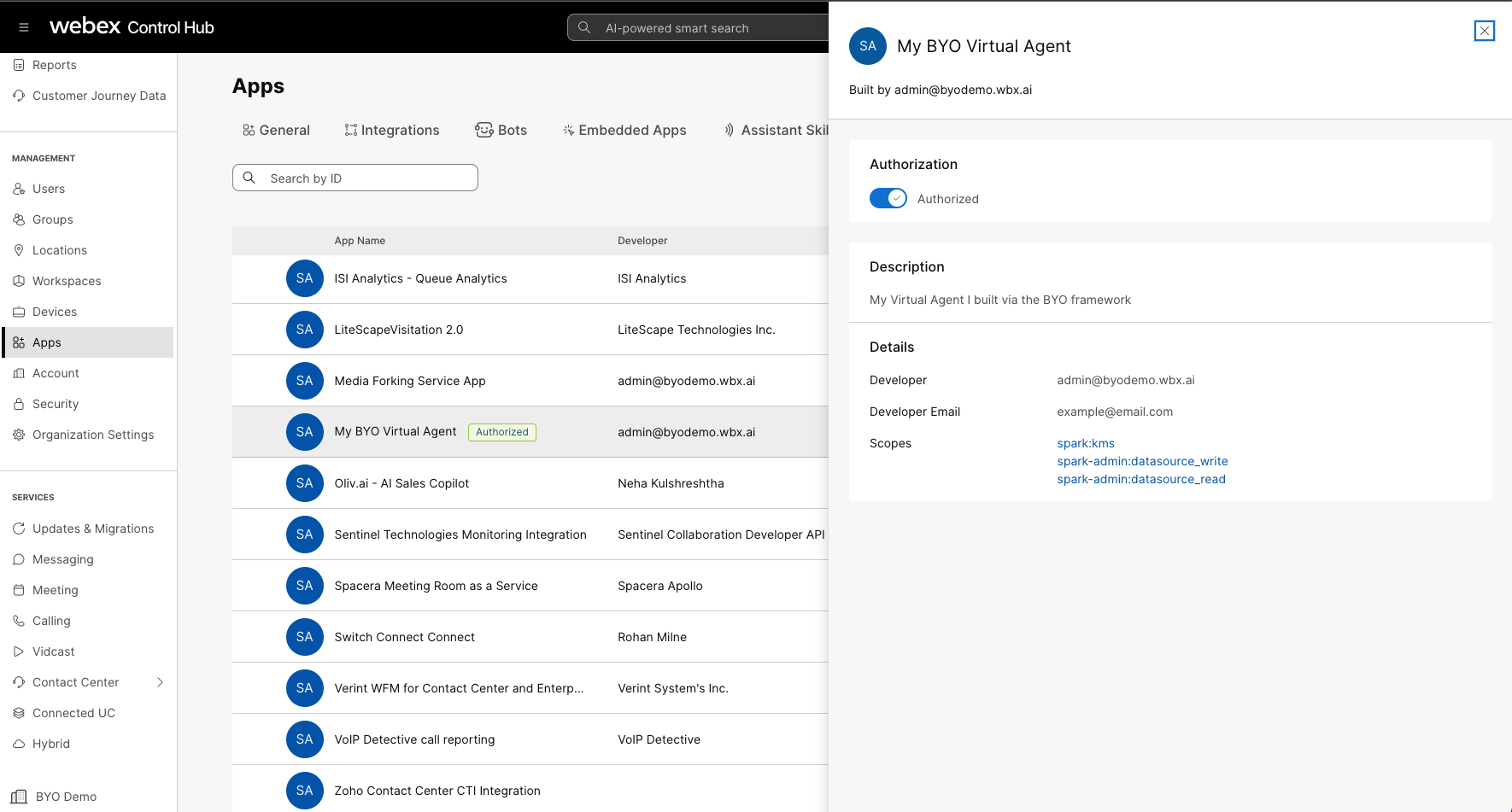
Generate Service App Token: As the provider, you must generate an access token for the authorized service app. Navigate to your service app in the developer portal and choose Generate Token for the customer org by selecting the org from the dropdown menu.
Register Data Source: Using the generated token, register your data source by making a POST request to the dataSources API:
POST https://webexapis.com/v1/dataSourcesInclude the following fields in your request body:
name: Unique identifier for the data sourcedisplayName: Human-readable nameurl: Your Virtual Agent endpoint URLauthToken: Authentication token (nonce) for secure communicationproviderId: Your service app's provider IDschema: Voice Virtual Agent schema ID (5397013b-7920-4ffc-807c-e8a3e0a18f43)state: Set toACTIVEto enable the data source
For detailed API documentation, refer to the Data Sources API.
anchorPhase 4 - Integrating Data Source
anchorOnce the data source is registered, you can integrate it into your contact center configuration:
Config creation: Navigate to Main Menu -> Contact Center -> Integration -> Features to create a new CCAI Config:
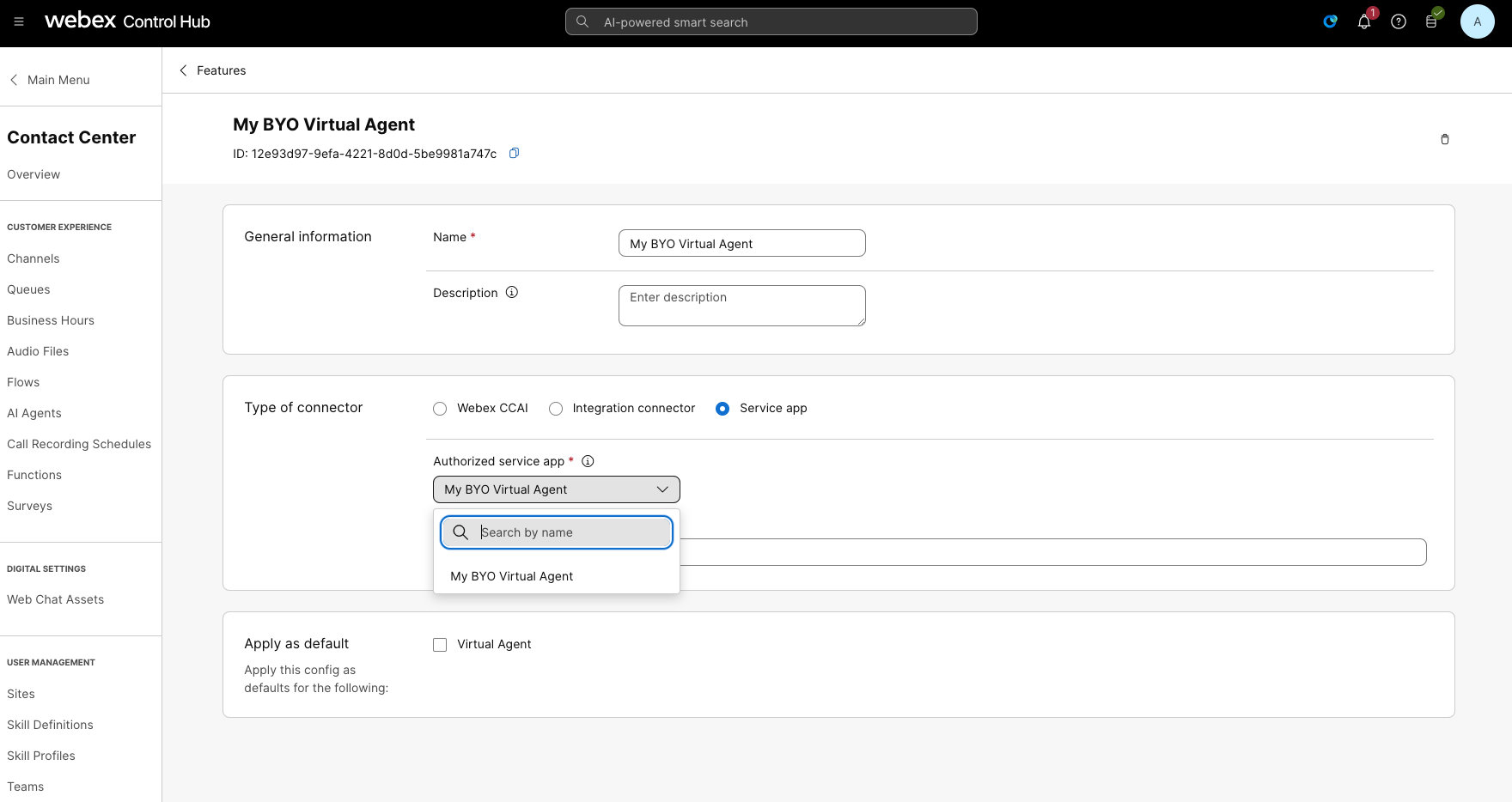
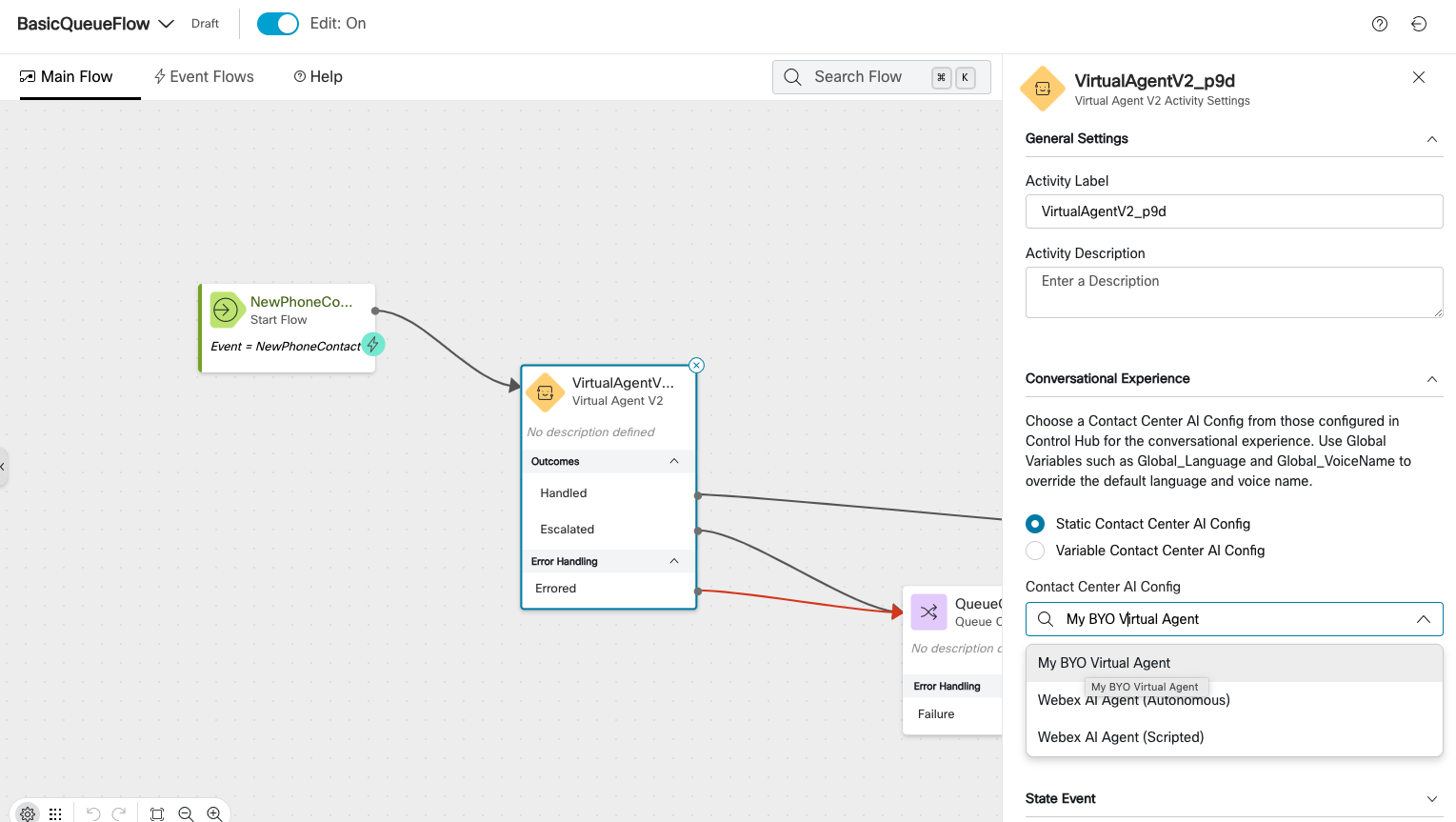
Flow Creation: Create a flow with the Virtual Agent Voice Activity and use the AI configuration you created above in the Flow Control UI.
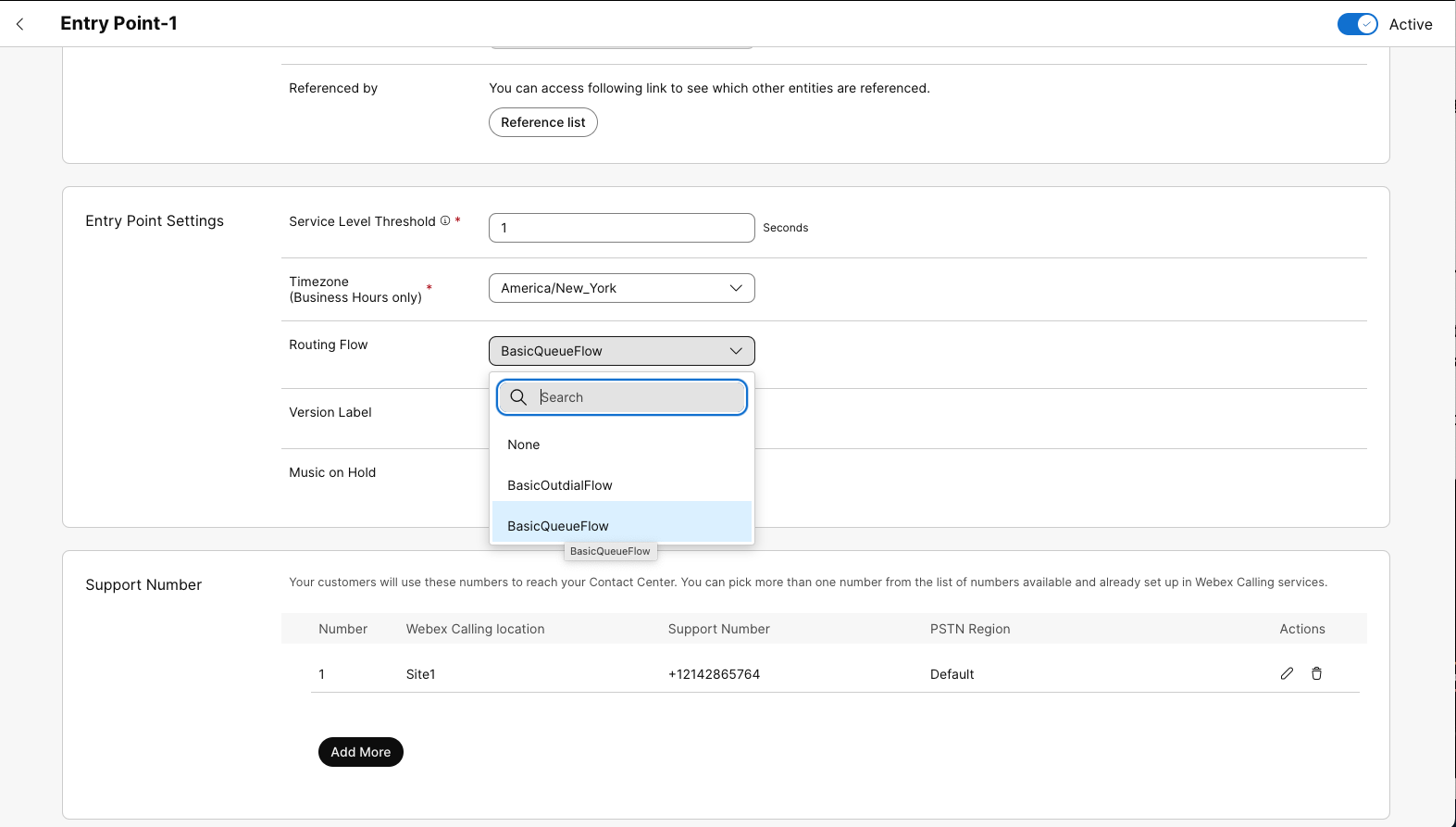
Entry Point Mapping: Map the EntryPoint to the newly created flow (Contact Center -> Channels -> Entry Point)
After these steps, make a call to the phone number specified in the entry point via your cell phone or Webex Calling Extension for Chrome if you are not in the US or Canada.
anchorPhase 5 - App Hub Submission Process and Review
anchorAll marketplace vendors need to go through the App Hub Submission Process. Once you have submitted the app for review, the application will be reviewed against these test cases:
| Theme | Description | Priority |
|---|---|---|
| Service App | Service app must be created with a mailer email ID that can be accessed by multiple users in the organization | Optional |
| Must provide onboarding documentation for customers | Mandatory | |
| Support emails, links and documentation must be provided. SLAs for all issues must be mentioned. | Mandatory | |
| Bring your own Data Source | Data Exchange Domains registered must be owned by the service app owner. Testing the application on a 3rd party hosting service is permitted but must switch over to a domain that's owned by the service app owner. | Mandatory |
| Demostrate logic to generate unique nonce for every customer onboarding the app. | Mandatory | |
| The logic to decrypt the JWS token received from: US Public Key or EU Public Key | Mandatory | |
| Update the nonce for the JWT token at least once every 1440 minutes (24 hours) | Mandatory | |
| Customer Setup | The customer would have to buy 3P-Virtual-Agent SKU to enable your service app | Mandatory |
| Customer must be able to discover and authorize your Service App | Mandatory | |
| Once the app is authorized, the data source must be registered automatically | Mandatory | |
| Create a "Feature" by navigating to "Contact Center -> Integrations -> Features" and creating a CCAI Config pointing to the Service App created by you. | Mandatory | |
| The CCAI Config should contain all the required fields necessary for the customer to connect to the project on the AI Vendor's portal | Optional | |
| Routing Logic | The customer must be able to configure the "Virtual Agent V2" activity in the flow designer or "VVA Element" in call studio, which points to the CCAI Config created. | Mandatory |
| Health Check | The server must send back the serving status as “SERVING” or “NOT_SERVING” while Cisco initiates Ping Tests. Look here for sample implementation | Mandatory |
| Call Events | The call must receive and respond to “CALL_START” event when the call is initiated from the entry point | Mandatory |
| The Virtual Agent must be able to respond to the caller with a permissable latency of 200 to 500 ms | Mandatory | |
| The call must end with "CALL_END" event. Showcased via the "debug" tab in the flow designer | Mandatory | |
| The call must be escalated to a queue of human agents with "AGENT_TRANSFER" event | Mandatory | |
| The caller must be able to interupt the Virtual Agent with "BARGE_IN" event | Optional | |
| The Virtual Agent must be able to process DTMF tones | Optional | |
| Send custom events, such as vendor config data or call associated data from the flow designer/call studio | Optional | |
| Post Call Events | The Virtual agent call must initiate and terminate at the flow designer in the "Virtual Agent V2" activity | Mandatory |
| Pass along the Virtual Agent transcript to the agent desktop using custom widget for Webex Contact Center | Mandatory | |
| Pass along the Virtual Agent transcript to the finesse using custom gadget for UCCE, PCCE and CCE | Mandatory | |
| Pass along any other insights to the agent desktop such as Virtual Agent Summary, Status or Sentiment Score | Optional |